
ReconLite: Engineering Case Study
A passive website security inspector that runs eight checks in parallel, streams the findings into a terminal-style interface, and is deliberately limited to reading what a site already publishes.
Live application: recon.farvees.xyz Source code: github.com/mrfarvees-official/reconlite
Overview
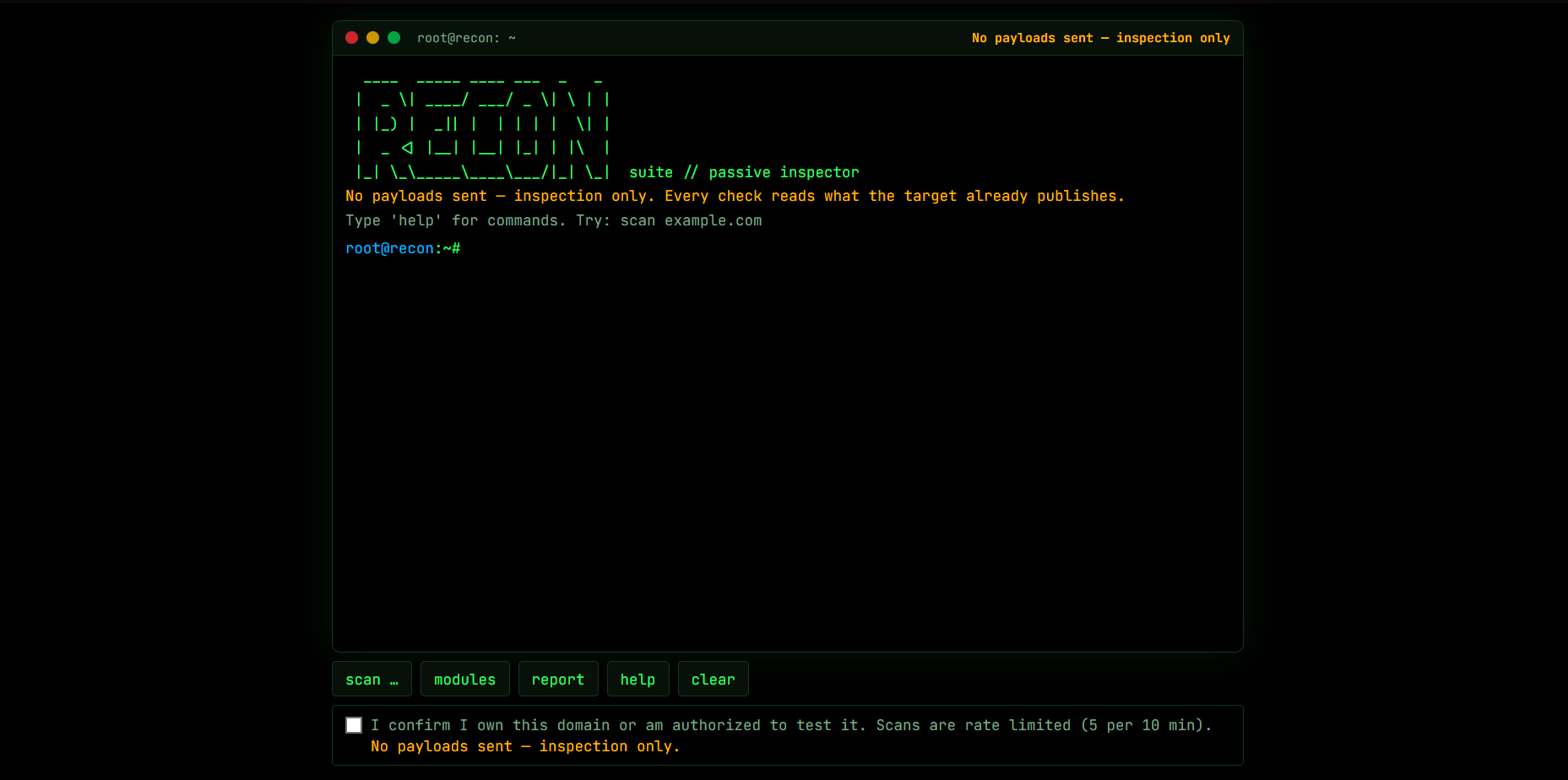
ReconLite (called Recon Suite in the app and README) takes a public domain, runs eight server-side checks at the same time, and streams each module's findings into a Kali-style terminal as soon as they finish. Every check reads something the target already discloses: response headers, cookie flags, certificate metadata, DNS records and version banners. "No payloads sent, inspection only" is visible on screen at all times.
| Item | Details |
|---|---|
| Role | Solo developer: scanner design, network safety layer, streaming API, terminal UI, report export, deployment |
| Timeline | Oct 2026 to present |
| Status | Live demo, actively developed |
| Live demo | https://recon.farvees.xyz |
| Source code | https://github.com/mrfarvees-official/reconlite |
| Stack | Next.js 16 App Router, React 19, TypeScript, Tailwind CSS 4, Node.js https, tls and dns, Server-Sent Events |
| Deployment | PM2 behind Nginx with a Let's Encrypt certificate, scripted in deploy/deploy.sh |
| Scale | About 1,600 lines of TypeScript, 8 isolated check modules, 1 API route, no database |
| Quality | Strict TypeScript and ESLint, both passing |
The problem
A useful security review of a website often starts with information the site already publishes: which headers it sends, how its cookies are flagged, when its certificate expires, whether its email domain is protected against spoofing, and which software versions it announces. Collecting and interpreting those signals by hand takes time, and many public scanners blur the line between inspecting a site and attacking it.
I wanted a tool that reads a site's security posture the way a reviewer would, without touching anything that could harm it. That meant a small, defensible scope and a scanner that cannot be turned against other people's networks.
Project goals
- Run several independent checks in parallel and show results as each one finishes.
- Turn every finding into something actionable, with a short explanation and a copy-pasteable fix.
- Never send an exploit payload or a malformed request.
- Make the scanner itself safe, since a tool that fetches user-supplied hostnames is an attack surface.
- Keep the whole thing small enough to read in an afternoon.
What it checks
ReconLite runs eight isolated modules. Each one is a single function that returns a list of findings with an id, a severity, a title, a detail and a fix.
| Module | What it reads | Why it matters |
|---|---|---|
| headers | CSP, HSTS, X-Frame-Options, X-Content-Type-Options, Referrer-Policy, Permissions-Policy | Missing or weak headers remove browser-enforced defenses against XSS, protocol downgrade and clickjacking. Each finding includes a fix. |
| cookies | Set-Cookie attributes | Secure, HttpOnly and SameSite limit theft and cross-site sending. Session-looking cookie names are rated higher. |
| cors | Access-Control-Allow-* in response to a made-up Origin | A server that reflects any origin and allows credentials lets other websites read a logged-in user's data. |
| tls | Certificate trust and expiry, negotiated protocol, and whether a legacy-only handshake is accepted | Expired or untrusted certificates and TLS older than 1.2 are the classic transport failures. |
| dns | SPF and DMARC records through DNS-over-HTTPS | Without enforced SPF and DMARC, anyone can spoof the domain in email. |
| tech | Server, X-Powered-By, the generator meta tag and JavaScript library filenames | Exact versions tell an attacker which known bugs to try. |
| cve | NVD lookup for the fingerprinted product and version | Turns banners into a concrete patching to-do list. |
| sqlleak | Verbose database error text in responses the site serves anyway | Strings such as SQLSTATE or ORA- reveal the database engine and query structure. |
Findings are rated critical, high, medium, low, info or ok, so a clean result is shown as clearly as a problem.
Architecture
Source layout
| Area | File |
|---|---|
| Streaming scan endpoint | app/api/scan/route.ts |
| One function per check | lib/modules/*.ts |
| Module list, timeouts and registry | lib/modules/index.ts |
| Shared homepage fetch and fingerprint | lib/context.ts |
| SSRF-safe networking | lib/net.ts |
| Rate limiting | lib/ratelimit.ts |
| Printable report | lib/report.ts |
| Terminal commands and UI | lib/commands.ts, components/Terminal.tsx |
| Client-safe module metadata and CVE caveat | lib/modules-meta.ts |
How a scan runs
What happens, step by step:
- Consent. The server rejects the request unless the authorization checkbox was confirmed. The UI checkbox is not trusted on its own.
- Validation. The input is normalized to a bare hostname. IP addresses, ports, paths and private-looking names are refused.
- Admission. A per-IP limiter allows 5 scans per 10 minutes and one active scan at a time, returning
429with aretry-afterheader. - Public DNS check. The domain is resolved through the same safe lookup used for every connection, with an 8-second timeout. Failure becomes one readable terminal line.
- Parallel modules. All eight run with
Promise.all. Each has its own timeout (20 to 25 seconds for most, 30 forsqlleak, 60 forcve) and emits amodule_start, then amodule_doneormodule_error. - Cleanup. A
finallyblock always releases the per-IP slot and closes the stream, even if the visitor disconnects midway.
A deliberately passive scope
The project sends no exploit payloads. Two modules are worth spelling out because they sit close to the line:
sqlleakinspects only the homepage,/robots.txtand/.well-known/security.txt, looking for database errors the server would return anyway. Nothing malformed is sent to provoke one.corssends one ordinary request with the headerOrigin: https://cors-probe.localand reads the answer. If that made-up origin comes back reflected together withAccess-Control-Allow-Credentials: true, it is rated high. No cross-origin request is ever completed against real user data.
This boundary is intentional. A public web form cannot reliably verify that a visitor owns the target, so the safest design is one where the worst possible request is a normal page load.
Protecting the scanner from SSRF
A tool that fetches user-supplied hostnames can be pointed at localhost, a cloud metadata address such as 169.254.169.254, or an internal service. That is the scanner's main application risk, so the network layer (lib/net.ts) has several independent defenses:
- Input validation.
normalizeDomainstrips schemes, paths and trailing dots, then accepts only a well-formed public hostname of up to 253 characters. IP literals,localhostand internal suffixes (.local,.localhost,.internal,.lan,.home,.corp) are refused. - Connect-time DNS check. Every outbound connection goes through a custom
safeLookup. It resolves the name and rejects the connection if any returned address is private, loopback, link-local, carrier-grade NAT, reserved or multicast. IPv4-mapped IPv6 addresses are unwrapped and checked too. - Why connect time matters. Checking the address at the moment the socket is opened, rather than validating once up front, also defeats DNS rebinding, where a name resolves to a public address first and a private one later.
- Narrow requests. Only HTTPS on port 443, only
GET, no compression, response bodies capped (512 KB by default), and a timeout on every request. - Careful redirects. The shared page fetch follows at most four redirects, and only to HTTPS URLs on the same site and the default port.
- Honest identification. Requests use a user agent that says they are passive, read-only inspection requests from a portfolio project.
Certificate errors are tolerated on purpose during the fetch so the page can still be read. The tls module is where an invalid certificate gets reported.
Streaming parallel checks
The scan endpoint returns a Server-Sent Events stream, so the interface can show progress instead of waiting for the slowest check.
- Each module emits its start immediately, and its result replaces the "scanning" line in the terminal when it arrives.
- A shared, memoised page fetch means the target receives one homepage request, even though four modules (
headers,cookies,tech,sqlleak) need it. The technology fingerprint is memoised the same way fortechandcve. - If the visitor closes the tab or presses Ctrl+C, the stream stops sending, and the concurrency slot is still released.
- The response sets
x-accel-buffering: noandcache-control: no-store, no-transformso a reverse proxy does not hold events back.
The terminal itself is a hidden input with styled text and a separate blinking caret element. It supports scan <domain>, modules, report, report pdf, clear and help, plus ↑/↓ command history (the last 100 commands, kept in the browser), Tab completion, Ctrl+C to abort a scan and Ctrl+L to clear.
Responsible CVE reporting
The cve module looks up fingerprinted products and versions in the National Vulnerability Database. A version match is evidence to investigate, not proof of a vulnerability. Linux distributions frequently backport security fixes without changing the upstream version number, so a banner can say "vulnerable" while the running binary is patched. The reverse also happens: a hidden banner does not mean a system is up to date.
So the interface always says: version-based matching can produce false positives if a fix was backported without a version bump. Results are phrased as "verify the real patch level", never "you are vulnerable".
NVD's public API is rate limited, so the module is built to stay polite:
- Lookups are spaced globally across concurrent scans.
- Results are cached for six hours.
- At most four products are looked up per scan, and each shows the top five matches with CVSS scores.
- A
403or429becomes a clear message instead of a stack trace. - An optional
NVD_API_KEYraises the limit from 5 to 50 requests per 30 seconds.
Abuse controls
- Server-enforced consent, so the confirmation cannot be skipped by calling the API directly.
- Rate limits: 5 scans per 10 minutes and one concurrent scan per IP address.
- Strict inputs: public hostnames only, HTTPS only, capped bodies and per-module timeouts.
- Errors: an unresolved domain, a timeout or a refused connection prints a single terminal-style line, never a stack trace.
- Safe output: the report HTML escapes all scanned text, because it comes from a server I do not control.
The limiter is intentionally in memory, which is enough for a single-process deployment. It trusts the x-forwarded-for header, so it must run behind a proxy that sets that header correctly.
What I didn't build, and why
I deliberately left out active exploitation testing: SQL injection, XSS and command-injection payloads, brute-forcing logins and directory enumeration.
- Authorization is the line. Reading public headers needs no permission. Sending an exploit string to a system does. A public form cannot verify that a visitor owns the target, and a checkbox only reduces misuse; it does not prevent it.
- Harm is asymmetric. A payload that triggers a bug can corrupt data or take down a service. A missing HSTS header cannot.
- It would change what the project is. A passive inspector is a defensible reporting tool. An active scanner needs scoping documents, rules of engagement and controls that a portfolio site cannot provide.
- The same classes of problem can still be found safely. The error-leak module shows a weakness by reading what the site already serves, without causing it.
If I extended this for real engagements, active testing would live in a separate tool that requires verified domain ownership (a DNS TXT challenge or a well-known file), a signed scope and an audit log, not a checkbox.
Reporting
report shows a summary of the last scan in the terminal. report pdf builds a printable HTML document with severity counts, one section per module, and the fix for each finding, and the browser's print dialog saves it as a PDF. Every piece of scanned text is HTML-escaped before it goes into the report.
Deployment
ReconLite is deployed on Ubuntu with PM2 running the production build on a local port, Nginx as the public reverse proxy, and a Let's Encrypt certificate from Certbot. deploy/deploy.sh makes the whole process repeatable:
- It pulls the latest code with a fast-forward-only update and runs as the checkout's owner rather than root.
- It installs Nginx, Certbot and PM2 if they are missing, builds the app, and restarts the PM2 process.
- It installs the site's Nginx configuration and requests or reuses the certificate.
- It can be re-run safely for every release.
- An optional
NVD_API_KEYcan be stored in a root-owned environment file with restricted permissions.
Engineering decisions and trade-offs
| Decision | Why it matters | Trade-off |
|---|---|---|
| Passive-only scope | The worst request is a normal page load, so the tool is safe to expose publicly | It cannot confirm exploitability, only point at likely weaknesses |
| Connect-time address check | Blocks private targets and DNS rebinding in one place | Slightly more code than validating the hostname once |
| One function per module with a shared context | Modules are isolated, easy to read and easy to add, and the target sees one homepage request | The shared page means a failure in the fetch affects several modules |
| Server-Sent Events instead of a single response | Results appear as each check finishes | Needs proxy buffering disabled for the endpoint |
| In-memory rate limiting | No extra infrastructure to run | Limits reset on restart and do not work across several instances |
| Version-based CVE matching with a clear caveat | Gives a useful to-do list from public information | Can produce false positives, so wording matters |
| Report as printable HTML | No PDF library and no server-side rendering | The user saves the PDF through the browser's print dialog |
Results
- A working scanner that gives a structured, readable security overview of any public domain in one run.
- A network layer that deliberately cannot be pointed at private infrastructure.
- Live results streamed per module, with a fix for every finding.
- A small codebase (about 1,600 lines of TypeScript) that passes the TypeScript compiler and ESLint with no errors.
- A scripted, re-runnable deployment on a live domain.
Current limitations
- The scan looks at the landing page only, not authenticated flows.
- There are no automated tests in the repository yet. The network safety functions are the first candidates.
- Rate limiting is in memory and keyed on
x-forwarded-for, which is safe only behind a correctly configured proxy. - Technology detection is heuristic and based on banners and filenames.
- The fallback to a parent domain for DMARC is naive for multi-part suffixes such as
co.uk. - CVE results depend on version strings and on NVD availability.
Next steps
- Add unit tests for
normalizeDomain,isPrivateIpandsafeLookup, since they carry the safety guarantees. - Replace the in-memory limiter with a shared Redis or key-value store for multi-instance deployments.
- Use a public-suffix-aware library for organizational-domain detection.
- Add verified domain ownership (a DNS TXT challenge or a well-known file) before any check that goes beyond passive inspection.
- Add fixture-based tests for the TLS, DNS and response-parsing modules.
- Save scan history so results can be compared over time.
Links
- Live application: recon.farvees.xyz
- Source code: mrfarvees-official/reconlite
- Portfolio: farvees.xyz
- GitHub: mrfarvees-official
ReconLite is an evolving engineering project. This case study describes the current repository and deployed application; planned work is listed separately under Next steps.