
 NVIDIA NIM
 Chrome Extension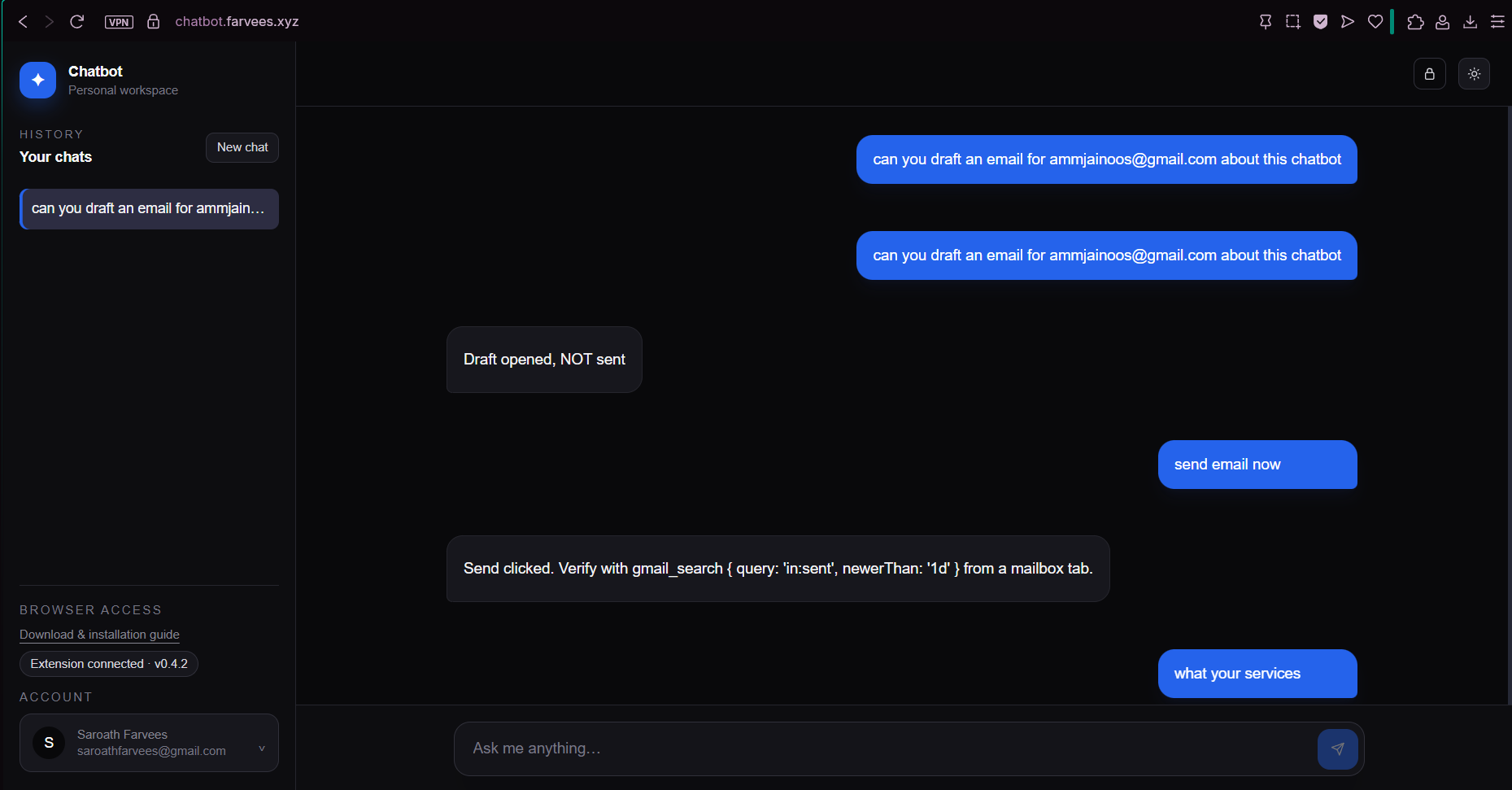
Portfolio Chatbot: Case Study
How to use this file A portfolio chatbot that answers visitor questions about me from a private knowledge base and, with a companion Chrome extension, can take approved actions in the visitor's browser: drafting Gmail messages, scheduling Calendar events and controlling Google Meet.
| Items | Details |
|---|---|
| Role | Full-stack developer: designed and built the product end to end as a solo project (UI, API, retrieval pipeline, auth, admin portal, tool routing, deployment) |
| Timeline | Oct 2026 to present |
| Status | Live demo, actively developed |
| Live demo | https://chatbot.farvees.xyz |
| Source code | https://github.com/mrfarvees-official/chatbot |
| Stack | Next.js 16, React 19, TypeScript, SQLite (better-sqlite3), Drizzle ORM, NVIDIA-hosted LLM (nvidia/nemotron-3.5-lightning-30b-a3b) and embeddings (nemotron-3-embed-1b, 2048 dimensions) through the OpenAI SDK, Tailwind CSS 4, Vitest |
| Key features | Retrieval-augmented answers, streaming NDJSON responses, saved chat sessions, local email and password accounts, admin knowledge-base portal, approval-gated Gmail, Calendar and Meet actions |
| Scale | 11 API routes, 7 SQLite tables (users, sessions, profiles, documents, chunks, chat sessions, chat messages), 42 browser tools exposed by the extension |
| Companion project | Site Agent Chrome extension (chatbot-agent-extension), which performs the browser actions in the visitor's own browser |
The problem
A portfolio page is static. A recruiter or client has to hunt through projects, skills and experience to answer simple questions like "Has he built RAG systems?" or "Is he available for freelance work?", and a contact form adds friction to the one thing I want them to do: get in touch.
I wanted a portfolio that could answer questions in my place and then help the visitor take the next step, such as opening a ready-to-review email to me, without becoming a toy that hallucinates facts or an agent that can do damage in someone's inbox.
[FILL: One or two sentences on why this mattered to you personally, e.g. "I was tired of recruiters asking the same five questions."]
Goals and constraints
Goals
- Answer only from facts I've published, and say "I don't know" instead of inventing.
- Stream responses so the chat feels instant.
- Let the assistant act in Gmail, Calendar and Meet, but keep a human approval step before anything irreversible.
- Make the knowledge base editable from an admin page, with no redeploys to update an answer.
Constraints I chose on purpose
- One small server. SQLite in a single file, no vector database, no queue, no managed auth. Cheap to run and easy to back up.
- One model call per user message for the knowledge path. Retrieval happens once, then a single streaming completion.
- Untrusted by default. Page text, email text and tool output are treated as data, never as instructions.
The solution
Three pieces working together:
- A RAG chat at
/. Questions are matched against chunked, embedded Markdown documents, and the top matches are injected into the system prompt. - An admin portal at
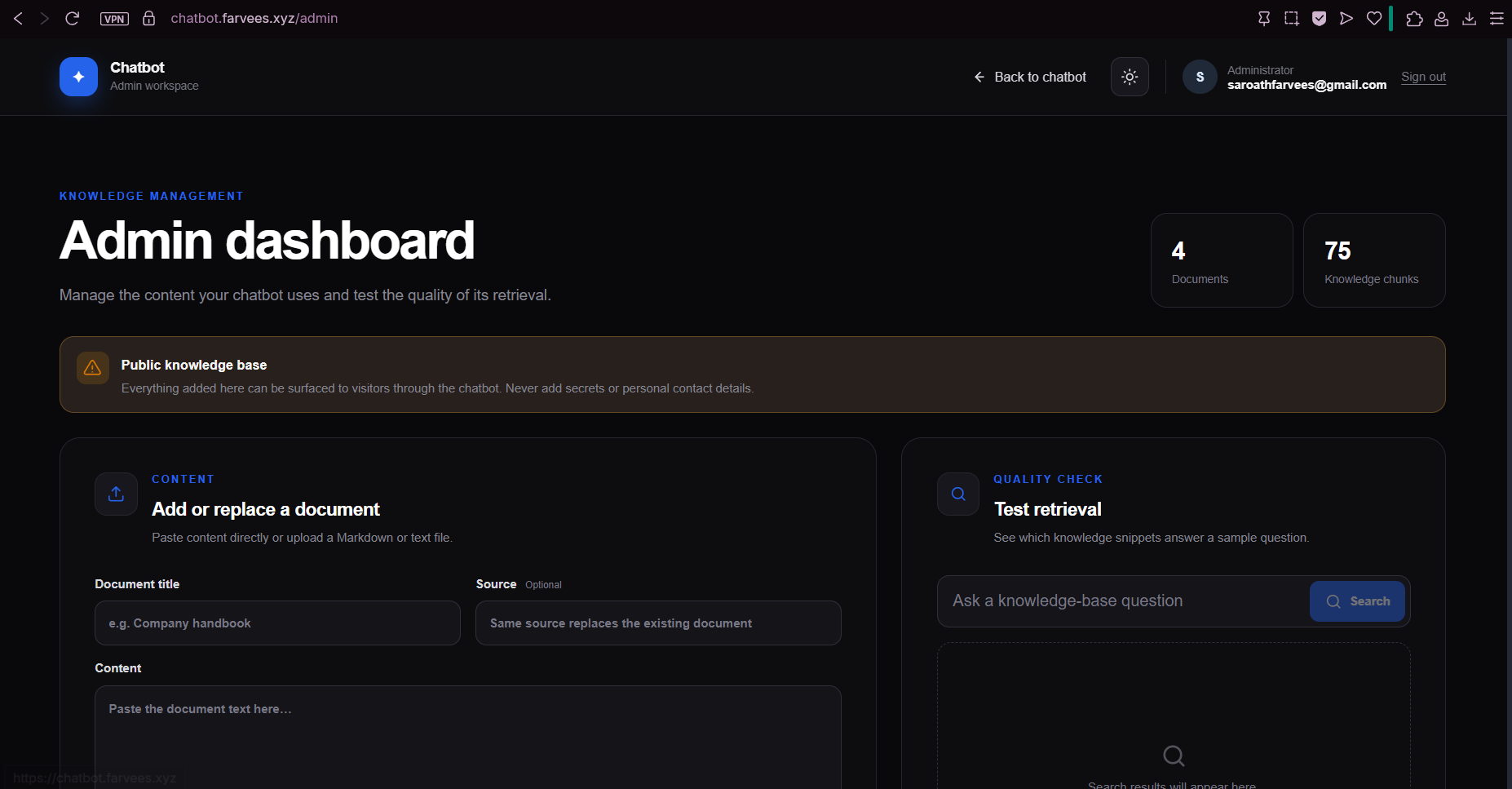
/admin. Ingest, replace, search-test and delete knowledge documents. - Browser actions through the Site Agent extension. The server only decides which tool to call. The extension, running in the visitor's own browser, performs it and asks for approval on anything outward-facing.
Visitors sign in with a local email and password account, can save a small profile (name, mobile) at /account so drafts can be filled in for them, and have their chat history saved as sessions.
Architecture
Key files
| Area | File |
|---|---|
| Chat endpoint, tool filtering, streaming | lib/chat-handler.ts |
| System prompt and model call | lib/llm.ts |
| Chunking | lib/chunk.ts |
| Embeddings | lib/embeddings.ts |
| Retrieval and ranking | lib/retrieval.ts |
| Ingestion | lib/ingest.ts |
| Auth and sessions | lib/local-auth.ts |
| Page-to-extension bridge | lib/extension-client.ts |
| Database schema | lib/local-db.ts |
How a message flows
(verified in code)
- The endpoint streams newline-delimited JSON (NDJSON) rather than Server-Sent Events, so the client can read it with plain
fetch. - The browser runs tool rounds. The server never touches Gmail; it returns a
tool_call, the browser asks the extension to execute it, and the result goes back in a fresh request. The client stops after 6 rounds to prevent loops. - Limits are enforced server-side: last 30 messages, 2,000 characters per user message, 6,000 per tool result, 4,000 for tool arguments.
The knowledge base (RAG)
Ingestion
Documents are Markdown files pasted or uploaded in /admin. On ingest the server:
- Hashes the text with SHA-256. If the source already exists with the same hash, it skips the work (
unchanged). - Splits the text into chunks.
- Embeds every chunk (batches of 32) before touching the database, so a failed embedding call never destroys the previous version.
- Replaces the old document and inserts the new chunks in one transaction.
Chunking
Heading-aware, because portfolio content is naturally sectioned:
- Markdown is split by heading, and the heading is prepended to every chunk from that section so a chunk like "Next.js, React" still knows it belongs to Technical Skills.
- Long sections are split on sentence boundaries to a max of 900 characters.
- Plain text without headings falls back to paragraph packing with a 150-character overlap that never starts mid-word.
- The document title is added to the text for embedding only, so stored chunks stay clean.
Retrieval
Embeddings use a 2048-dimension NVIDIA model with separate passage and query input types. Ranking is a hybrid score: cosine similarity plus a lexical bonus for each query term found in the chunk. This rescues exact-match queries (a project name, a tool name) that pure embeddings sometimes rank too low. An optional RAG_MIN_SIMILARITY threshold drops weak matches.
Grounding
The system prompt tells the model to answer from the supplied context, say "I don't know" and give my contact email when the context is silent, refer to me in the third person, and treat context as reference data, not instructions.
Short caption explaining what the reader should notice.
Browser actions with the Site Agent extension
The chatbot can act on the visitor's behalf in Google services through a separate Chrome extension. The page and extension talk over a window.postMessage bridge (PING, LIST_TOOLS, CALL_TOOL) that checks origin and a per-request ID, with timeouts so a missing extension never hangs the chat.
There are around 40 tools across Gmail, Calendar and Meet, including drafting, searching, replying, archiving, labelling, scheduling, joining meetings, and reading captions. Examples of how they are exposed:
| Visitor state | What the server allows |
|---|---|
| Extension installed, signed in | Draft/compose tools, plus the authenticated read, search, reply, archive, delete, label and Meet-control sets |
| No extension | No tools sent to the model at all, and the prompt tells it not to pretend an action happened |
Safety rules baked into the prompt and the flow:
- Drafting is the review step. The assistant opens a draft, then asks whether the visitor wants to press Send.
- Sending and deleting go through an approval popup shown by the extension. Denying it performs nothing.
- The assistant must never claim an email was sent, only that Send was clicked, and must never invent a recipient, date or reason.
- Visitor profile values (name, mobile) can be injected into tool arguments with placeholder tokens, so private data fills the draft without being shown to the model more than needed.
Making a small model call tools reliably
Sending 40 tool schemas to a 20B-parameter model on every message is slow and error-prone. Three layers in chat-handler.ts keep it focused:
sanitizeToolsvalidates every tool the browser supplies: name pattern, description and schema size caps, a cap of 64 tools, and an allowlist that depends on whether the user is signed in.selectToolsForQuerylooks at the latest message and sends only the relevant family of tools (a calendar question gets calendar tools, an ordinary knowledge question gets none).preferredToolForQueryforces a specific tool when intent is unambiguous, for example the first calendar lookup always starts with the search tool. It also respects negations like "don't send it yet" and doesn't inherit an old forced action from an earlier turn.
This cut the prompt size, reduced wrong-tool calls, and made behaviour testable, because routing is plain functions with unit tests rather than model luck.
Security and trust model
| Risk | Mitigation |
|---|---|
| Prompt injection through retrieved docs, web pages or emails | Context and tool output are labelled as untrusted data in the prompt; irreversible actions need an out-of-band approval popup the model cannot click |
| Unauthenticated use of a paid model API | /api/chat returns 401 without a valid session; per-IP limits of 30 requests per minute and 300 per day return 429 |
| Admin takeover | Admin routes require requireAdmin(); admin identity comes from an ADMIN_EMAILS allowlist; unauthenticated /admin and /api/admin/* return 401 |
| Password and session theft | Passwords hashed with salted scrypt; session tokens stored only as SHA-256 hashes; cookie is httpOnly, sameSite=lax, secure in production, 30-day expiry |
| Leaking private data into answers | Every ingested document is treated as public; the README warns never to ingest secrets or contact details |
| Unsafe model output | Prompt forbids raw HTML and unsafe URLs; a custom Markdown viewer renders headings, tables and Mermaid diagrams without injecting HTML |
| Oversized or malformed requests | Message count, character and tool-argument caps; orphan tool messages are dropped; a conversation can't end on an assistant turn |
Data model
Everything lives in one SQLite file (.data/chatbot.sqlite, WAL mode, foreign keys on), created automatically on first start.
| Table | Purpose |
|---|---|
users, sessions, profiles | Local accounts, hashed session tokens, saved name and mobile |
documents, chunks | Knowledge sources and their embedded chunks (embedding stored as JSON) |
chat_sessions, chat_messages | Saved conversations, with a per-session message order |
Challenges and decisions
| Challenge | What I decided | Why |
|---|---|---|
| Needed semantic search but not another service | Store embeddings as JSON in SQLite and rank in application code | A personal portfolio has a few hundred chunks; a vector DB would cost more to run than it saves |
| Pure vector search missed exact names | Hybrid score: cosine plus lexical term bonus | Project and tool names matter more to this audience than paraphrase |
| Re-ingesting could leave a document half-updated | Embed first, then delete-and-insert in one step; skip identical content by hash | Failures never destroy the last good version |
| Model hallucinated that it had sent mail | Strict prompt rules plus "only say Send was clicked" plus real tool results only | Trust matters more than a smooth reply |
| Too many tools confused the model | Query-aware tool selection and forced first tool | Smaller prompt and more predictable behaviour |
| Gmail and Meet have no stable API for this use | Drive the real UI from a browser extension with explicit approval | Works with the visitor's own session; no OAuth token ever reaches my server |
| [FILL: your own hardest bug, e.g. streaming cut off on Nginx, or the extension bridge timing out] | [FILL] | [FILL] |
Testing
npm test runs Vitest suites for the pure, security-sensitive parts:
- Chat validation: accepts saved conversations, drops orphan tool messages, rejects an assistant-final turn and oversized arguments.
- Tool sanitization and routing: public vs authenticated tool sets, description limits, tool-family selection, forced first tool, send-after-draft routing, negation handling, schema preservation.
- Prompt contract: the prompt explains absent tools, requires explicit email requests to use a tool, and profile placeholders are filled correctly.
- Chunking: empty input, long paragraphs, heading prefixes, no mid-word overlap.
- Model request: the Gmail tool and automatic tool choice are actually sent to the API.
The repo also includes a manual test plan (login, ingest/replace/delete, 401 checks, extension connection, draft-then-approve flow) because the Gmail and Meet selectors and the live model's tool-calling behaviour can only be verified against the real services. I list that honestly in the README under Unverified integrations.
Deployment
- Next.js app run under PM2 on a localhost port, with Nginx as the public reverse proxy and HTTPS from Certbot.
LOCAL_DB_PATHpoints at an absolute, persistent path and the SQLite file is backed up.- Streaming needs proxy buffering disabled for
/api/chat[FILL: confirm this is what you did]. - Secrets (
NVIDIA_API_KEY,ADMIN_EMAILS, and so on) come from environment variables;.envis never committed. - The packaged extension (
public/downloads/site-agent.zipplus a JSON file with version, size and SHA-256) is served from the site, with an installation guide at/extensionfor Chrome, Edge and Opera GX.
Result
- A working portfolio assistant that answers from my own documents, cites nothing it doesn't know, and points visitors to me when it can't answer.
- A reviewed, approval-gated path from "I'd like to hire him" to a pre-addressed Gmail draft.
- A knowledge base I can edit in a browser, with idempotent re-ingestion.
What I'd do next
- Shared rate limiting. The limiter is in memory and keyed on
x-forwarded-for. That's fine for one instance behind a trusted proxy, but a Redis or KV store would be needed for several instances. - Scale retrieval. Today every chunk is loaded and scored on each query. Past a few thousand chunks I'd move to
sqlite-vecor pgvector. - Source citations in the UI. The model already receives numbered sources; surfacing them as clickable references would build trust.
- Evaluation set. A small file of question → expected-fact pairs, run in CI, to catch regressions when I change chunking, prompts or models.
- Extension verification automation. Selector tests for Gmail and Meet UI changes.
- Origin authentication for the extension, so trusted sites aren't allowlisted by default.
What I learned
Getting a model to use tools reliably turned out to be mostly an engineering problem, not a prompting one. Sending dozens of tool schemas on every message made the model slower and more error-prone, so I moved the decision into plain, testable functions that pick the relevant tool family and force the first tool when the intent is clear. Once routing was ordinary code, I could unit test it instead of hoping the model behaved.
For anyone building a first RAG app, I would say that chunking and retrieval matter more than the model. Keeping the heading on every chunk, combining embedding similarity with a simple keyword bonus, and making ingestion safe to re-run did more for answer quality than any prompt change. A small SQLite file was enough for a portfolio-sized knowledge base, and I only needed to think about a vector database once I looked at how many chunks I actually had.
The biggest shift was how I think about trusting model output. I now assume the model will sometimes be wrong or be fooled by text inside an email or web page, so the safety does not live in the prompt. It lives in the system around it: a risk level on every tool, an approval popup the model cannot click, default deny on timeout, and an audit log of what ran. A model that is asked to be careful is a weaker guarantee than a design where carelessness cannot do damage.
Links
- Source: https://github.com/mrfarvees-official/chatbot
- Live demo: https://chatbot.farvees.xyz
- Extension repo: https://github.com/mrfarvees-official/chatbot-agent-extension
- Portfolio: https://farvees.xyz
- GitHub: https://github.com/mrfarvees-official