
 Chrome Extension
 Gmail
Gmail Google Calendar
 Google Meet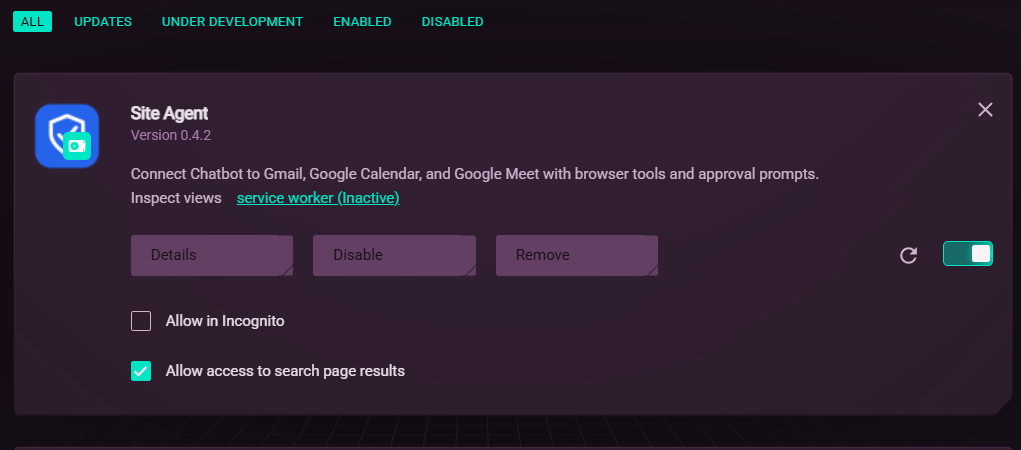
Overview
Site Agent is a Manifest V3 Chrome extension that lets my portfolio chatbot use Gmail, Google Calendar and Google Meet through the visitor's own browser, with a human approval popup before anything irreversible. There is no Google API, no OAuth and no server-side access to anyone's mailbox.
| Item | Details |
|---|---|
| Role | Solo developer: designed and built the bridge, rules engine, approval flow, site adapters, console and packaging |
| Timeline | Oct 2026 to present |
| Status | Live demo, actively developed. Current version 0.4.2 |
| Distribution | Unpacked ZIP from the chatbot's /extension page, with install steps for Chrome, Edge and Opera GX |
| Install guide | https://chatbot.farvees.xyz/extension |
| Source code | https://github.com/mrfarvees-official/chatbot-agent-extension |
| Stack | TypeScript, Chrome Extension APIs (Manifest V3), esbuild, Vitest, ESLint |
| Size | About 2,400 lines of TypeScript including tests, 5 bundled entry points, 42 public tools |
| Companion project | Portfolio Chatbot: https://farvees.xyz/work/chatbot |
The problem
My chatbot can decide that a visitor wants to email me, schedule a meeting or join a call. Actually doing it is the hard part:
- The Gmail, Calendar and Meet APIs need OAuth. That means a Google Cloud project, consent screens, review, and storing refresh tokens for strangers on my server. That is a lot of liability for a portfolio.
- Letting an AI click "Send" is dangerous. A model can hallucinate a recipient, be tricked by text inside an email, or simply be wrong.
- The chatbot lives on my domain; the actions happen on Google's. A web page cannot reach into another tab.
I needed something that runs on the visitor's side, uses the session they are already signed into, and cannot do anything irreversible without a human click.
Goals and constraints
Goals
- Give the chatbot a clear, small catalogue of tools it can discover and call.
- Make every tool carry a risk level, and enforce approval by risk, not by trusting the model.
- Keep my server completely out of the loop. It never sees a Google token or a mailbox.
- Make the extension inspectable: a console to run tools by hand, pause everything, switch tools off and review an audit log.
Constraints I chose on purpose
- No Google API, no OAuth. The extension operates the signed-in web UIs.
- No server and no model key in this repo. It is purely the hands; the chatbot is the brain.
- Narrow trust. Only my chatbot's origin and
localhostcan talk to it. - Default deny for anything irreversible.
The solution
Three cooperating parts inside one extension:
- A bridge (content script) injected into the trusted chatbot page. It speaks a tiny protocol:
PING,LIST_TOOLS,CALL_TOOL. - A background service worker that enforces the rules: trusted origin, public allowlist, pause switch, disabled tools, risk-based approval, and the audit log.
- Site adapters injected into Gmail, Calendar and Meet tabs that know how to read and operate each page. A generic fallback adapter covers everything else.
Plus an extension console (click the toolbar icon) to list tabs, attach one, run any tool with an auto-generated form, pause execution, toggle tools and read the audit log.
Architecture
Source layout
| Area | File |
|---|---|
| Rules, approvals, tab management, audit | src/background.ts |
| Page-to-extension bridge | src/bridge.ts |
| Injected into Google tabs, routes to an adapter | src/content.ts |
| Adapter contract and risk types | src/core/types.ts |
| Adapter lookup with generic fallback | src/core/registry.ts |
| Schema argument validation | src/core/validate.ts |
Consistent { ok, ... } results | src/core/outcome.ts |
| Gmail, Calendar, Meet, generic adapters | src/adapters/*.ts |
| Public tool allowlist | src/site-tools.ts |
| Safe Send-button matching | src/gmail-send-control.ts |
| Approval popup | approve.html, src/approve.ts |
| Console | console.html, src/console.ts |
The bridge protocol
A web page and an extension cannot call each other directly, so they exchange messages:
Request type | Reply |
|---|---|
PING | { ok: true, version, apiVersion: 2 } |
LIST_TOOLS | Array of enabled public tools with name, description, risk, inputSchema |
CALL_TOOL with name, args | A tool outcome with an explicit ok boolean |
Details that matter:
- The page sends
source: "portfolio-chat"with a uniqueid; the extension replies withsource: "portfolio-ext"and echoes theid, so concurrent calls cannot be mixed up. - Both sides ignore any message not from the same window and same origin.
- Tool discovery does not need a live Google tab, so the chatbot can show what it can do before anything is open.
- Outcomes are normalised: anything without an
okboolean is wrapped as{ ok: true, tool, result }, and failures return{ ok: false, reason }, so the chatbot always gets one predictable shape. - A client timeout does not cancel execution, which is documented so the chatbot checks before retrying a state-changing call.
A risk model instead of trust
Every tool is classified once, in code, and the service worker enforces it:
| Risk | Meaning | Execution |
|---|---|---|
read | Reads visible content; may navigate or open panels | Runs immediately |
write | Reversible or draft-producing | Runs immediately |
irreversible | Cannot be undone | Always requires the approval popup |
Of the 42 public tools (13 Gmail, 10 Calendar, 19 Meet), the irreversible ones include sending a draft, deleting an email or event, joining or leaving a call, sending Meet chat, recording, and muting or removing a participant.
The approval popup is built so the model cannot get around it:
- It is a separate extension-owned window, not something on the chatbot page, so page scripts cannot click it.
- Default deny. Closing it, ignoring it for 60 seconds, or a failure to create the popup all result in not running the action.
- It shows an adapter-specific preview (for Gmail Send, recipients come first, then subject and body), capped at 1,500 characters.
- It is centered and follows the chatbot's light or dark theme, synced from the page's
data-theme.
Adapters: one interface for three very different pages
Each site is a SiteAdapter with the same contract: which hosts it matches, its tools, a compact page snapshot, an optional approval preview, a health check and an execute function. A registry picks the first adapter that matches the tab's URL and falls back to a generic one.
This made the rest of the system site-agnostic:
- The service worker never contains Gmail logic. It only asks the adapter in the target tab to preview or execute.
- Adding a new site means writing one adapter and registering it.
- The
healthcheck reports which selectors currently resolve, which is how I find out quickly when Google changes its markup.
Design choices worth noting:
- Drafting without typing. Gmail drafts are opened through a generated compose URL with recipients, subject and body, rather than by simulating keystrokes.
- Tool descriptions are written for an LLM: when to use the tool, what it returns and what it does not do (for example, the compose tool states that it does not send).
- Flat, validated schemas. Arguments are checked against a small JSON-Schema subset (required fields, types, enums) before any adapter runs.
Hard problems and how I solved them
1. Clicking the right Send button, or none
Gmail's compose window has Send, Schedule send and a send-options arrow, sometimes across several open drafts. The matcher (gmail-send-control.ts) accepts only a visible, enabled control whose label really is "Send" (including Send (Ctrl+Enter) forms), strips invisible bidirectional characters from labels, and refuses to act if it finds zero or more than one candidate. Failing is better than sending the wrong draft. A successful click also does not prove delivery, so the docs say to verify in Sent.
2. Manifest V3 service workers forget everything
Chrome can kill the background worker at any time. The attached tab ID is therefore stored in chrome.storage.session, tab load waits have timeouts, and tab messages time out instead of hanging forever, so a restart mid-task degrades into a clear error rather than a stuck chat.
3. Permissions without scaring people
The manifest requests only storage, scripting and tabs, plus host access to my chatbot origin and localhost. Access to Google sites is an optional host permission requested per origin, on demand, the first time automation needs it, and it can be revoked from the console.
4. Knowing what happened afterwards
The audit log records timestamp, tool name, source (site or console), outcome and only the argument key names, never the values. It keeps 200 entries and shows the latest 50. A global pause switch and per-tool enable switches block execution and remove tools from discovery.
5. Stale code in tabs that were already open
After I rebuilt and reloaded the extension, Google tabs that were already open still held the old injected adapter, so new tools and selector fixes appeared not to work. I added a guard flag so the content script can never be injected twice into the same page, and documented the reload routine: reload the extension, refresh the chatbot page to reconnect the bridge, and refresh automated Google tabs. Separately, the console's browser_health tool reports which selectors resolve on the attached page, which turns "it doesn't work" into a specific broken selector.
Security and trust model
| Risk | Mitigation |
|---|---|
| A random website talks to the extension | Bridge only runs on trusted origins (chatbot.farvees.xyz, localhost, 127.0.0.1); same-window, same-origin messages only; the service worker re-checks sender metadata |
| Model tries a dangerous tool the site shouldn't offer | Public allowlist of 42 tools; console-only tools (browser_*, generic_click_text) return tool_not_allowed_for_site to the page |
| Prompt injection from email or page text | Irreversible actions need out-of-band human approval; Gmail read results mark message content as untrusted data |
| Wrong or hallucinated action | Default-deny popup with preview; strict Send matching; validated arguments |
| Silent over-permission | Optional per-origin host access, revocable in the console |
| Forgetting what ran | Audit log, pause switch, per-tool toggles |
| Leaking private values to logs | Audit stores argument key names only |
Honest limitations:
- The public demo trusts the origin. Any script running on the trusted page can use the bridge, including
readandwritetools that skip the approval popup. Untrusted HTML and scripts must stay out of that page. - Some
writetools act immediately. For example, Calendar update, add guests and RSVP click Save without a popup. - Reads return real mailbox and meeting content to the requesting chatbot.
Testing
npm test runs Vitest suites for the parts that are pure logic:
- Public tool contract: exactly the expected 42 tools are exposed, with the right names and risks.
- Bridge discovery: discovery works without a responsive attached tab, and disabled tools are filtered out.
- Gmail Send control: accepts the real Send label and rejects hidden, disabled, scheduled and options controls.
- Popup layout: the approval window is centered correctly.
Gmail draft validation and URL generation, and outcome normalisation, are also covered. These tests use mocks; they do not open Chrome or hit live Google pages, so the README ships a manual browser checklist (draft, deny Send, approve Send to a test address, mailbox search, Calendar draft stays unsaved, Meet approvals, a public call to a console-only tool is rejected, pause and disable behave).
Build and distribution
- esbuild bundles five IIFE entry points (
background,bridge,content,approve,console) targeting Chrome 110, and copies the manifest, HTML, theme and icons intodist. npm run watchrebuilds on change.- For visitors, the chatbot's build script packages only the runtime files into
site-agent.zipwithmanifest.jsonat the archive root, plus a small JSON file with the version, size and SHA-256 shown on the install page. - It is loaded through Developer mode → Load unpacked, not the Chrome Web Store, because a store listing for an extension that operates Gmail needs a full review. Publishing it there is on my roadmap.
Result
- A chatbot that goes from "I'd like to hire him" to a reviewed Gmail draft without my server ever touching a mailbox.
- A catalogue of 42 tools with a single, enforceable risk model.
- A deliberately small attack surface: one trusted origin, an allowlist, default-deny approvals, and an audit trail.
What I'd do next
- Authenticate the origin with a signed token from the chatbot instead of trusting any script on the page.
- Put more
writetools behind approval, at least Calendar update, add guests and RSVP. - Selector resilience: run each adapter's
healthcheck on a schedule and surface breakage in the console. - Publish to the Chrome Web Store so installation is one click and updates are automatic.
- Per-recipient and per-domain rules for sending (for example only ever allow drafting to addresses the visitor typed).
- Live end-to-end tests against a throwaway Google account to complement the mock-based suite.
What I learned
Building an AI that acts changed how I think about safety: I stopped asking the model to be careful and started designing so that carelessness cannot do damage. Putting a risk level on every tool and enforcing approval in code, in a window the page cannot touch, is a much stronger guarantee than any instruction in a prompt.
Manifest V3 taught me to treat the background service worker as something that can disappear at any moment. Anything that must survive, like the attached tab, goes into storage, and every wait gets a timeout so a failure turns into a clear message instead of a hang.
Driving a real web interface is also fragile by nature, since Google can change its markup at any time. Making the extension fail loudly, by refusing to click when it is not sure which Send button is the right one and by exposing a health check for every selector, mattered more than making it clever.
Links
- Source: https://github.com/mrfarvees-official/chatbot-agent-extension
- Companion chatbot: https://github.com/mrfarvees-official/chatbot
- Live chatbot: https://chatbot.farvees.xyz
- Install guide: https://chatbot.farvees.xyz/extension
- Portfolio: https://farvees.xyz
- GitHub: https://github.com/mrfarvees-official